

Applying for the Taiwan Arrival Card (TWAC) takes about 5 minutes and costs nothing. Taiwan’s National Immigration Agency lets every traveler complete the form online from any device. This guide walks you through the exact submission process, field by field, so you know what to expect before you start.
Where to Apply for the Taiwan Arrival Card
The official Taiwan Arrival Card portal is twac.immigration.gov.tw. This is the only legitimate website where you can submit the TWAC. The portal is run by Taiwan’s National Immigration Agency (NIA).
Do not use third-party sites that charge fees ranging from $20 to $80 for what is a free government service. Many of these sites appear as paid ads in Google search results above the official portal. Always verify the URL ends in .gov.tw – Taiwan’s government domain restriction.
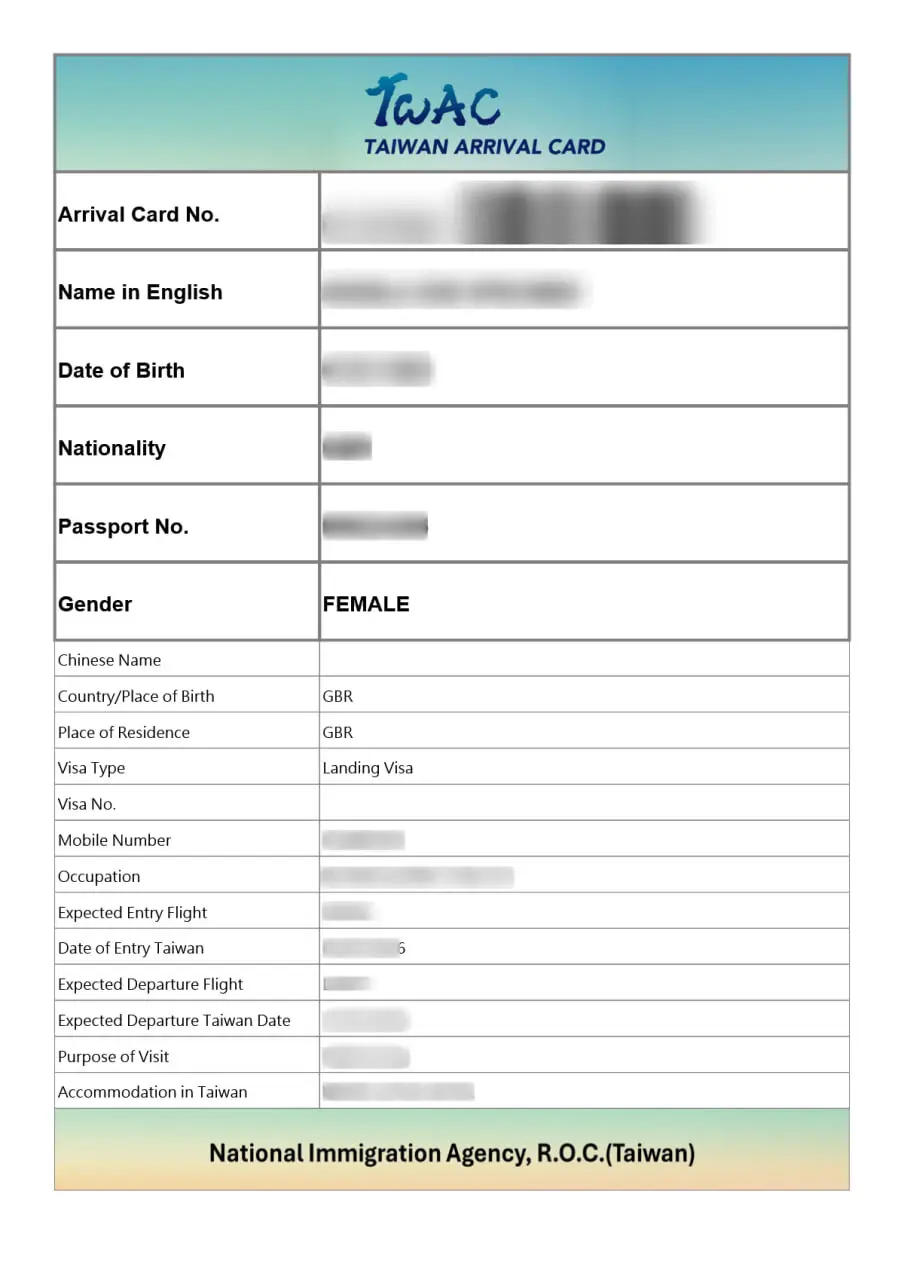
Step-by-Step: How to Fill Out the Taiwan Arrival Card
Before you begin, have the following ready:
- Your passport
- Your email address (accessible on your phone)
- Your flight number
- Your Taiwan accommodation address or hotel name
Step 1: Open the Official Portal
Navigate to twac.immigration.gov.tw in your web browser. The site works on desktop, laptop, tablet, and smartphone browsers. No app download is required.
Step 2: Select Your Language
The portal supports multiple languages. Select your preferred language from the language options at the top of the page. English is available and commonly used by international travelers.
Step 3: Enter Personal Information
Fill in your personal details exactly as they appear on your passport:
| Field | What to Enter | Common Mistakes |
|---|---|---|
| Full name | Exactly as on passport | Using nicknames or abbreviations |
| Passport number | All characters, letters and numbers | Confusing 0 with O, 1 with I |
| Nationality | Country of your passport | Confusing with country of residence |
| Date of birth | DD/MM/YYYY format | Mixing up month and day |
| Gender | As listed on passport | – |
Critical: Your name on the TWAC must match your passport exactly. If your passport shows “Michael J. Smith,” do not enter “Mike Smith” or “Michael John Smith.” Match the passport precisely.
Step 4: Provide Contact Details
Enter your email address and phone number:
- Email address: This is where your confirmation with QR code will be sent. Use an email you can check on your phone at the airport. Gmail, Outlook, and Yahoo are common choices.
- Phone number: Include your international country code. For example: +1 for the US, +44 for the UK, +91 for India, +63 for the Philippines.
Step 5: Enter Travel Information
Provide your flight and travel details:
- Flight number: Your arriving flight (e.g., CI 101, CX 452, JL 99). If you have a connecting flight, enter the flight that arrives in Taiwan.
- Arrival date: The date your flight lands in Taiwan.
- Expected departure date: An approximate date is acceptable. If you are unsure, enter your best estimate.
Step 6: Fill In Accommodation Details
Enter where you will be staying in Taiwan:
- Hotel guests: Hotel name and address. If you have a booking confirmation, copy the details from there.
- Airbnb or host stays: Use the residential address provided by your host.
- Multiple stays: Enter your first accommodation address.
Step 7: State Your Occupation
Type your actual job title or student status. This is a free-text field. Examples:
- “teacher”
- “software engineer”
- “student”
- “retired”
- “business owner”
- “unemployed” (also acceptable if relevant to you)
Step 8: Review and Submit
Before submitting, carefully check every field:
- Is your passport number correct?
- Is your email address typed correctly?
- Does your name match your passport exactly?
- Is your flight number correct?
- Is your arrival date accurate?
Once you are satisfied, submit the form.
Step 9: Check Your Email
Within minutes, you receive an email from the NIA system containing:
- Your TWAC confirmation details
- A QR code (embedded in the email or as an attachment)
- Instructions for presenting it at Taiwan immigration
Check your spam or junk folder if the email does not appear in your inbox within 30 minutes.
What If You Do Not Have the Required Information?
Sometimes travelers do not have all the information ready. Here is how to handle common gaps:
No flight number yet: Wait until you have booked your flight before submitting the TWAC. The flight number is a required field.
No accommodation booked: You can submit the TWAC even without a confirmed hotel booking. Enter a hotel you plan to book, or use your most likely accommodation address. You can update this later if needed.
No email address: You need an email to receive the confirmation. Create a free account with Gmail or Outlook if you do not have one. The airport kiosk option also requires an email.
No smartphone: Your confirmation email includes a QR code that can be printed. Print it before departure or use the airport kiosks on arrival.
Submitting on Mobile Devices
The TWAC portal works on mobile browsers. On your phone:
- Open Safari, Chrome, or your preferred browser
- Navigate to twac.immigration.gov.tw
- The form adapts to mobile screen sizes
- Enter your details using the on-screen keyboard
- Use the camera to scan your passport if the feature is available
- Submit and save the confirmation email
For the best experience on a small screen, use landscape orientation when filling in longer fields like your accommodation address.
Applying at the Airport: Kiosk Option
Taiwan airports provide tablet kiosks in the arrival hall for travelers who did not submit the TWAC online. These kiosks are located before the immigration counters.
Using a kiosk on arrival:
- Find the TWAC kiosk station (follow signs for “Arrival Card” or ask airport staff)
- Tap the screen and select your language
- Enter the same information as the online form
- Submit and note the confirmation number
- Present the number at the immigration counter
While kiosks are available, submitting online before your trip is faster and avoids delays at the airport. The kiosk option exists as a backup, not a replacement for advance submission.
Updating or Resubmitting the Taiwan Arrival Card
If you realize after submitting that you made an error, you can simply resubmit the form. The latest submission replaces the previous one in the system.
Common reasons for resubmission:
- Typo in passport number
- Wrong flight number (changed flights)
- Email address error (need confirmation at the correct email)
- Wrong arrival date
To update, go back to twac.immigration.gov.tw and complete the form again with the correct information. Use the same passport number – this ensures the new submission replaces the old one.
Taiwan Arrival Card Submission Timeline
| When to Submit | Recommendation |
|---|---|
| 7 days before arrival | Earliest allowed submission |
| 3-5 days before departure | Recommended window |
| 1-2 days before departure | Acceptable but less time for corrections |
| Day of flight | Risky – email delays or tech issues possible |
| At airport (kiosk) | Backup option only |
The best practice for international travelers is to submit the TWAC as soon as the 7-day window opens if your travel dates are confirmed.
Frequently Asked Questions About TWAC Online Application
Related Resources
For a complete overview of the TWAC and common questions, visit our Taiwan Arrival Card FAQ.
To understand what fields you need to prepare before applying, read our Taiwan Arrival Card Fields Explained guide.
If you encounter issues with your submission, check our Taiwan Arrival Card Not Received troubleshooting guide.
For US citizens with specific questions, see our Taiwan Arrival Card for US Citizens guide.