

You submitted the Taiwan Arrival Card (TWAC) but the confirmation email never arrived. This is one of the most common problems travelers face with the TWAC. Do not panic – your TWAC may still be in the system. This guide covers every step to find your confirmation, resubmit if needed, and arrive in Taiwan prepared.
Why Your TWAC Confirmation Email Might Not Arrive
The TWAC system sends confirmation emails automatically after successful submission. If you have not received yours, the most common reasons are:
- Spam or junk folder: Automated government emails sometimes trigger spam filters
- Typo in your email address: A single wrong character sends the email to nowhere
- Email provider blocking: Some providers block emails from .gov.tw domains
- Submission not completed: The form was not fully submitted before closing the browser
- System delay: Rarely, high traffic can delay email delivery by minutes to hours
- Full inbox: Your mailbox may be at capacity
Most cases fall into the spam folder category. Check there first before attempting resubmission.
Step 1: Check Your Spam and Junk Folders
This resolves the majority of “missing” TWAC confirmations:
- Open your email on a computer or phone
- Navigate to your Spam, Junk, or Promotions folder
- Search for emails containing “twac,” “arrival card,” “immigration,” or “Taiwan”
- Look for the sender: the email comes from an address associated with twac.immigration.gov.tw
- If found, mark it as “Not Spam” to ensure future emails from the NIA arrive in your inbox
- Save or screenshot the QR code from the email
Common email provider locations:
| Provider | Where to Check |
|---|---|
| Gmail | Spam folder, Promotions tab |
| Outlook/Hotmail | Junk Email folder, Other tab |
| Yahoo | Spam folder |
| iCloud | Junk mailbox |
| ProtonMail | Spam folder |
Step 2: Search Your Entire Email Inbox
If you cannot find the email in spam, search your entire mailbox:
- Search terms: “twac”, “arrival card”, “Taiwan”, “immigration”, “QR code”
- Search for the sender domain: “immigration.gov.tw”
- Check all folders including Archive and Trash
- If you use email filtering or rules, check if the email was automatically sorted
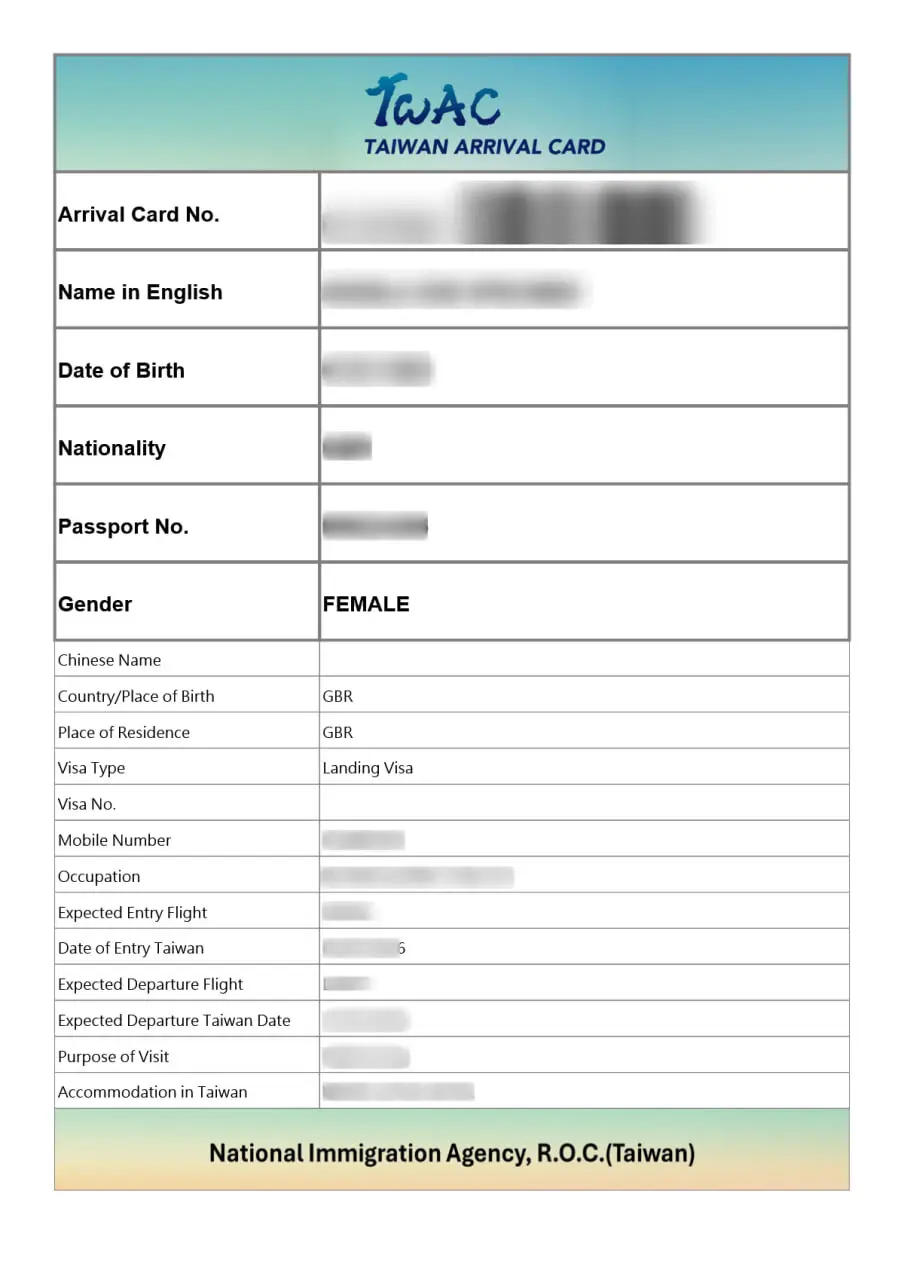
Step 3: Verify Your Submission Was Completed
Before assuming the email was lost, confirm you actually completed the submission:
- Did you click the final “Submit” button on the TWAC form?
- Did you see a confirmation screen after submitting?
- Did you close the browser window before the process finished?
- Were there any error messages during submission?
If you are unsure whether the submission went through, there is no public status checker for individual submissions. The safest approach is to resubmit the TWAC with your correct information.
Step 4: Resubmit the Taiwan Arrival Card
If you cannot find the confirmation email after checking all folders, resubmit the form:
- Go to twac.immigration.gov.tw
- Select your language
- Enter all information exactly as before (passport number, name, etc.)
- Triple-check your email address – this is the most common source of errors
- Submit the form
- Wait up to 30 minutes for the confirmation email
- Check spam/junk again after resubmitting
Resubmitting does not cause problems. The system uses your passport number to link the submission to your identity. A new submission replaces any previous one with the same passport number.
Checking Your Email Before Resubmitting
Before you resubmit, verify that your email address is correct. Common typos:
| Intended | Common Typo |
|---|---|
| [email protected] | [email protected] |
| [email protected] | jane@outlookcom |
| [email protected] | [email protected] |
| [email protected] | [email protected] |
If you spot a typo in your original email entry, that explains why the confirmation never arrived. Resubmit with the corrected email.
Step 5: Try a Different Email Address
If your primary email provider is blocking the TWAC confirmation, try a different email:
- Create a free Gmail or Outlook account if needed
- Resubmit the TWAC using the new email address
- Check both the inbox and spam folder of the new account
Some company email systems and smaller email providers have aggressive spam filters that block emails from foreign government domains. Gmail and Outlook are the most reliable for receiving TWAC confirmations.
Step 6: Contact the National Immigration Agency
If resubmission does not work and you have tried multiple email addresses, contact the NIA directly:
- NIA website: www.immigration.gov.tw
- NIA hotline: +886-2-2388-9393 (Taiwan time, business hours)
- Email: Contact form available on the NIA website
Provide your full name, passport number, nationality, and travel dates. The NIA can verify whether a TWAC exists in their system for your passport.
What to Do If You Arrive at Taiwan Airport Without a TWAC Confirmation
If you land in Taiwan without a TWAC confirmation, you are not blocked from entering. Here is what happens:
- Proceed to the immigration area at the airport
- Look for TWAC kiosks (tablet stations in the arrival hall)
- Submit the TWAC using the kiosk – it takes about 5 minutes
- Note your confirmation number
- Proceed to the immigration counter
Taiwan airports at Taoyuan (TPE), Songshan (TSA), Kaohsiung (KHH), and Taichung (RMQ) all have TWAC kiosks available. QR codes are also posted near immigration for mobile submission.
Using the airport kiosk adds 10-15 minutes to your arrival process. Arriving without a pre-submitted TWAC is not an immigration violation, but it delays your passage through immigration.
Common TWAC Submission Errors That Cause Missing Confirmations
Beyond email typos, these submission errors can result in missing confirmations:
Browser closed too early: If you close the browser before the submission processes fully, the form may not go through. Wait for the confirmation screen before closing.
Internet connection lost: If your connection drops during submission, the data may not reach the server. Submit again when your connection is stable.
Form partially filled: The TWAC requires all mandatory fields. If you left a required field blank, the submission would have been blocked with an error message. Check that you completed every field.
Session timeout: If you take too long to fill out the form, your session may expire. Start a new submission if this happens.
Preventing TWAC Email Issues on Future Trips
For your next trip to Taiwan, take these preventive steps:
- Submit early: Submit the TWAC as soon as the 7-day window opens. This gives you time to troubleshoot email issues.
- Use a reliable email: Gmail and Outlook have the best track record for receiving government emails.
- Screenshot the confirmation: After receiving the email, screenshot the QR code and save it to your phone’s photo gallery.
- Print a backup: Print the QR code and keep it with your passport.
- Add to contacts: Add the sender email to your contacts after receiving your first confirmation to prevent future blocking.
Frequently Asked Questions About Missing TWAC Confirmation
Related Resources
For a complete overview of the Taiwan Arrival Card, visit our Taiwan Arrival Card FAQ.
For instructions on how to fill out the form correctly, see our How to Apply for Taiwan Arrival Card Online guide.
To understand what information you need before starting the submission, read our Taiwan Arrival Card Requirements guide.
For general Taiwan entry information, check our Taiwan Entry Requirements 2025 checklist.